

Bleemeo MCP Server
Description
Section titled “Description”The Bleemeo MCP Server is a tool designed to enhance your infrastructure monitoring capabilities. With its AI-driven features, you can easily access and analyze your system metrics, alerts, and data through a conversational interface.
Beyond the inventory of your agents, services and containers, the assistant can read the metric history itself: fetch the data points of any metric, or run your own PromQL queries to aggregate, compare and correlate time series across your infrastructure.
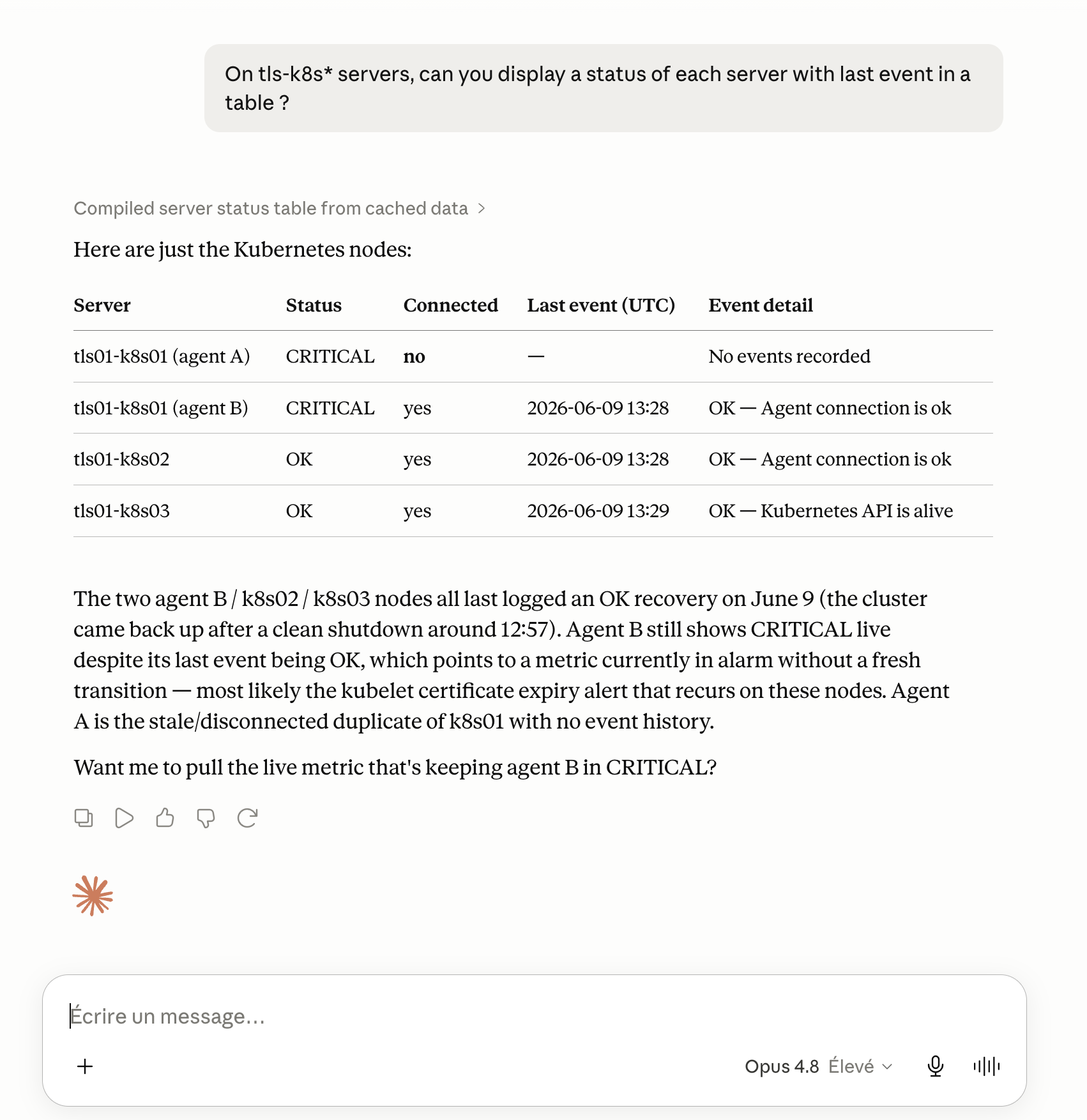
For example, asking an assistant for the status of your servers is answered live from your Bleemeo data through the MCP server:
Features
Section titled “Features”| Name | Description |
|---|---|
| List of accounts | Retrieves the list of all available Bleemeo accounts |
| Get an account | Gets the details of a specific account by its identifier |
| List of agent facts | Lists the facts collected by monitoring agents, containing metadata about monitored systems |
| Get an agent fact | Retrieves a specific agent fact by its identifier |
| List of agent types | Lists the different types of available agents (AWS, Kubernetes, SNMP, etc.) |
| Get an agent type | Gets detailed information about a specific agent type |
| List of agents | Retrieves the list of all Glouton agents deployed and connected to the platform |
| Get an agent | Gets complete details of a specific agent (status, configuration, metrics) |
| List of applications | Lists all applications monitored by Bleemeo |
| Get an application | Retrieves the details of a specific application |
| List of audit logs | Lists the history of actions performed on the platform (audit logs) |
| Get an audit log | Gets a specific audit log by its identifier |
| List of customers | Lists all customers in the Bleemeo system |
| Get a customer | Retrieves detailed information about a specific customer |
| List of containers | Lists all monitored Docker/Kubernetes containers |
| Get a container | Gets details of a specific container (status, metrics, configuration) |
| Initialize Context | Initializes the MCP session context with authentication and configuration information |
| List of events | Lists all monitoring events (alerts, incidents, state changes) |
| Get an event | Retrieves the details of a specific event |
| Make a global search | Performs a global search across all Bleemeo resources (agents, services, containers, etc.) |
| List of Glouton config items | Lists Glouton agent configuration items |
| Get a Glouton config item | Gets a specific Glouton configuration item |
| List of healthchecks | Lists all healthchecks configured for services |
| Get a healthcheck | Retrieves the details of a specific healthcheck |
| List of invoices | Lists all invoices associated with accounts |
| Get an invoice | Gets the details of a specific invoice |
| List of logs | Retrieves logs from the monitored infrastructure |
| List of metrics | Lists the metrics collected on your infrastructure, filterable by name, item, agent, status or a search string |
| Get a metric | Gets the details of a specific metric (labels, thresholds, current status) |
| Get metric data | Retrieves the data points of a metric over a time period |
| Run a PromQL query | Runs a PromQL query and returns the resulting data points over a time period |
| List of services | Lists all detected and monitored services (web servers, databases, etc.) |
| Get a service | Gets details of a specific service (metrics, status, configuration) |
| List of users | Lists the users of the account |
| Get a user | Retrieves information about a specific platform user |
Resources
Section titled “Resources”Prompts
Section titled “Prompts”| Name | Parameters | Description |
|---|---|---|
| Initialize Context | - Name - Language |
Initializes the MCP session context with user information. The user has two options: either talk directly to the MCP (the context will be initialized automatically), or use this prompt to manually initialize the context with their name and preferred language for personalized interactions. |
Supported clients
Section titled “Supported clients”The Bleemeo MCP Server supports both HTTP and Remote MCP transports and can be used with a wide range of AI clients:
Chat interfaces: AnythingLLM, ChatGPT, Claude Desktop, HuggingChat, Le Chat (Mistral)
Code editors: Cursor, Kiro, OpenCode, Visual Studio Code, Windsurf, Zed
CLI tools: Claude Code, Gemini CLI
The MCP base URL is: https://mcp.bleemeo.com/mcp
Authentication
Section titled “Authentication”OAuth support - Authenticate using your existing Bleemeo account to easily access your various organizations.
- When launching the MCP, an external page will open in a web browser.
- Enter your Bleemeo credentials.
- You will be redirected to an authorization page displaying the permissions requested and asking which account you want to use the MCP on.
- After authorizing, you can close the page and return to the AI.