

Kubernetes Monitoring Overview
Bleemeo provides comprehensive monitoring for your Kubernetes clusters. Deploy the Bleemeo agent as a DaemonSet to get full visibility into your cluster’s health, workloads, and services.
Key Features
Section titled “Key Features”Automatic Service Discovery
Section titled “Automatic Service Discovery”The Bleemeo agent automatically discovers and monitors services running in your Kubernetes pods. It detects all known services and gathers container metrics without manual configuration.
Pod and Workload Metrics
Section titled “Pod and Workload Metrics”Track the health of your Kubernetes workloads with metrics including:
- Pod counts by state (pending, running, succeeded, failed)
- Pod restarts to detect unstable applications
- CPU and memory requests/limits for resource planning
- Metrics are labeled by namespace, owner kind (deployment, daemonset, etc.), and owner name
Cluster Health Monitoring
Section titled “Cluster Health Monitoring”Monitor the overall health of your Kubernetes infrastructure:
- Node count and availability
- Namespace count and state
- Kubernetes API status with cluster-wide consensus
- Kubelet status per node (disk, memory, processes, readiness)
Certificate Expiration Tracking
Section titled “Certificate Expiration Tracking”Never miss a certificate renewal with automatic monitoring of:
- Kubernetes CA certificate expiration
- Node certificate expiration
Prometheus Integration
Section titled “Prometheus Integration”Scrape Prometheus metrics from your applications using Pod annotations:
prometheus.io/scrape- Enable scrapingprometheus.io/path- Custom metrics pathprometheus.io/port- Custom metrics port
See Prometheus integration for details.
Cluster Dashboards
Section titled “Cluster Dashboards”When a cluster is discovered, Bleemeo creates two dashboards for it. Their widgets count, rank and aggregate per node or per namespace, so they stay readable from a few pods to thousands. Widgets that have no data, for instance the autoscaler widgets on a cluster without HorizontalPodAutoscaler, are hidden.
Kubernetes Health
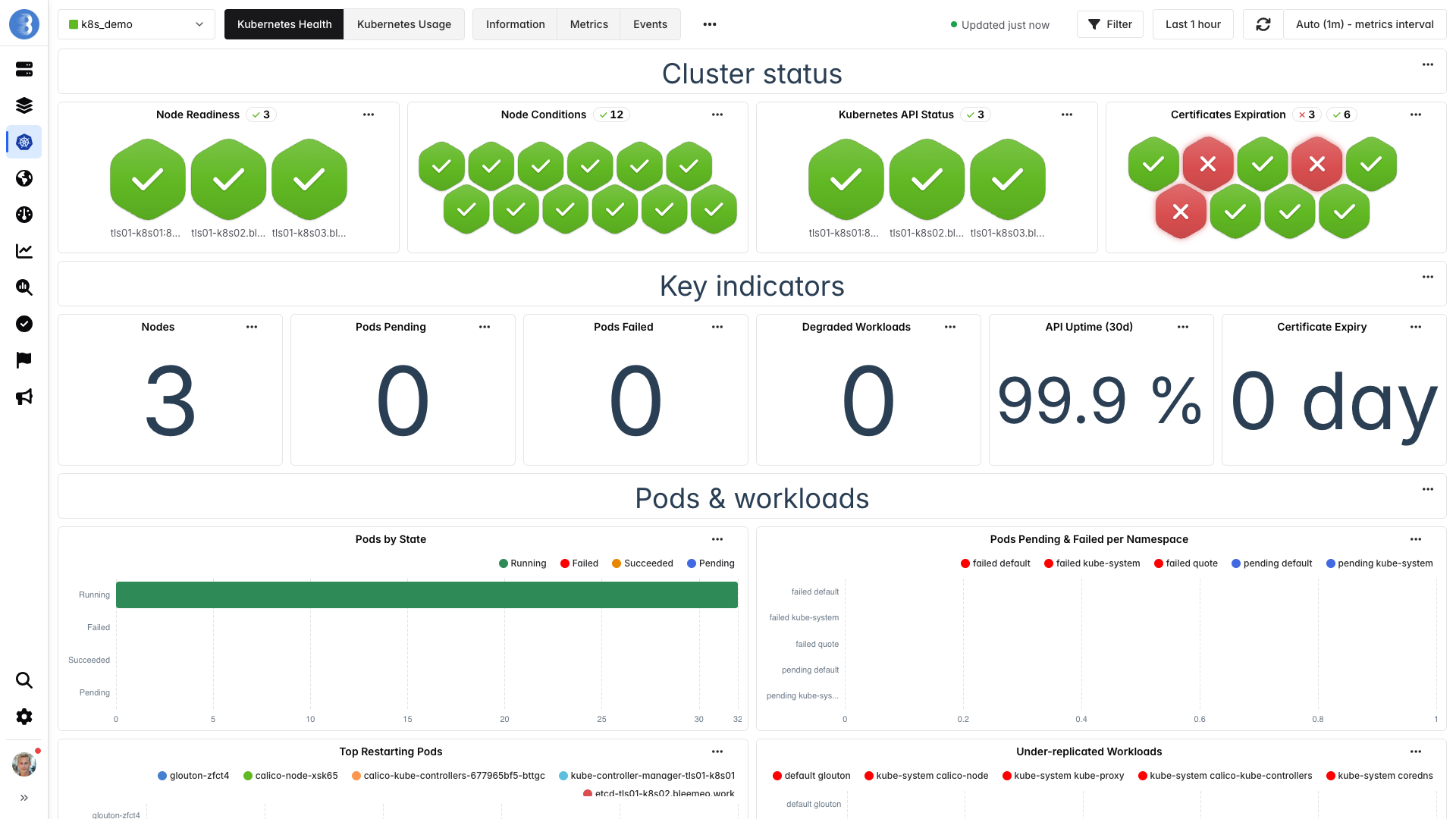
Section titled “Kubernetes Health”The Kubernetes Health dashboard, shown above, answers “is something broken?”. It is organized in sections:
| Section | Widgets |
|---|---|
| Cluster status | Node readiness and node conditions per node, Kubernetes API status, and certificates expiration status |
| Key indicators | Number of nodes, pending pods, failed pods and degraded workloads (fewer ready replicas than desired), uptime of the Kubernetes API over the last 30 days, and days left before the first certificate expires |
| Pods & workloads | Pods by state, pending and failed pods per namespace, the 15 pods that restarted the most over the last hour, and under-replicated workloads |
| Autoscalers status, autoscalers pinned at their maximum replicas while wanting more, CronJobs with missed runs, and Jobs with failed pods | |
| Kubernetes API server | Response time of the Kubernetes API |
Kubernetes Usage
Section titled “Kubernetes Usage”The Kubernetes Usage dashboard answers “how much of the cluster is used, and by whom?”. It helps with capacity planning and right-sizing:
| Section | Widgets |
|---|---|
| Overview | CPU and memory requested by the pods as a percentage of what the nodes can allocate, pod slots used, and number of namespaces, nodes and running pods, then running pods per namespace |
| Node resources | CPU, memory, disk and IO utilization per node |
| Top consumers | The top pods by CPU, memory and CPU throttling, and the top volumes by usage and by IO utilization |
| Per-pod detail | CPU and memory used per pod |
| Requests & limits | CPU and memory requests and limits per pod |
| Autoscaling & batch jobs | Autoscaler saturation (desired replicas as a percentage of the maximum), duration of the last run of each Job, and time since the last successful run of each CronJob |
| Usage over time | CPU and memory usage of each node over the period |
| Network | Network traffic per node and per container |
| All series (detail) | CPU, memory, CPU throttling, volume usage and volume IO per pod |
The metrics behind these widgets are listed in Kubernetes metrics.
Getting Started
Section titled “Getting Started”- Install the agent - Deploy using kubectl or Helm
- View metrics - Explore available Kubernetes metrics
- Upgrade - Keep your agents up to date
How It Works
Section titled “How It Works”The Bleemeo agent runs as a DaemonSet, with one agent instance on each node. All agents in a cluster collaborate to:
- Monitor services on their respective nodes
- Aggregate cluster-wide metrics
- Provide consensus-based API health status
- Report to a unified cluster view in Bleemeo Cloud
Your cluster appears as a single entity in the Bleemeo dashboard with drill-down capabilities to individual nodes, pods, and services.
Requirements
Section titled “Requirements”- Kubernetes 1.19 or later
- Access to create DaemonSets, ConfigMaps, and ServiceAccounts
- Bleemeo account with Professional plan