

Health Checks Dashboards
Free
Starter
Professional
On this page you can see a list of health checks. By default only the ones with problems are displayed.
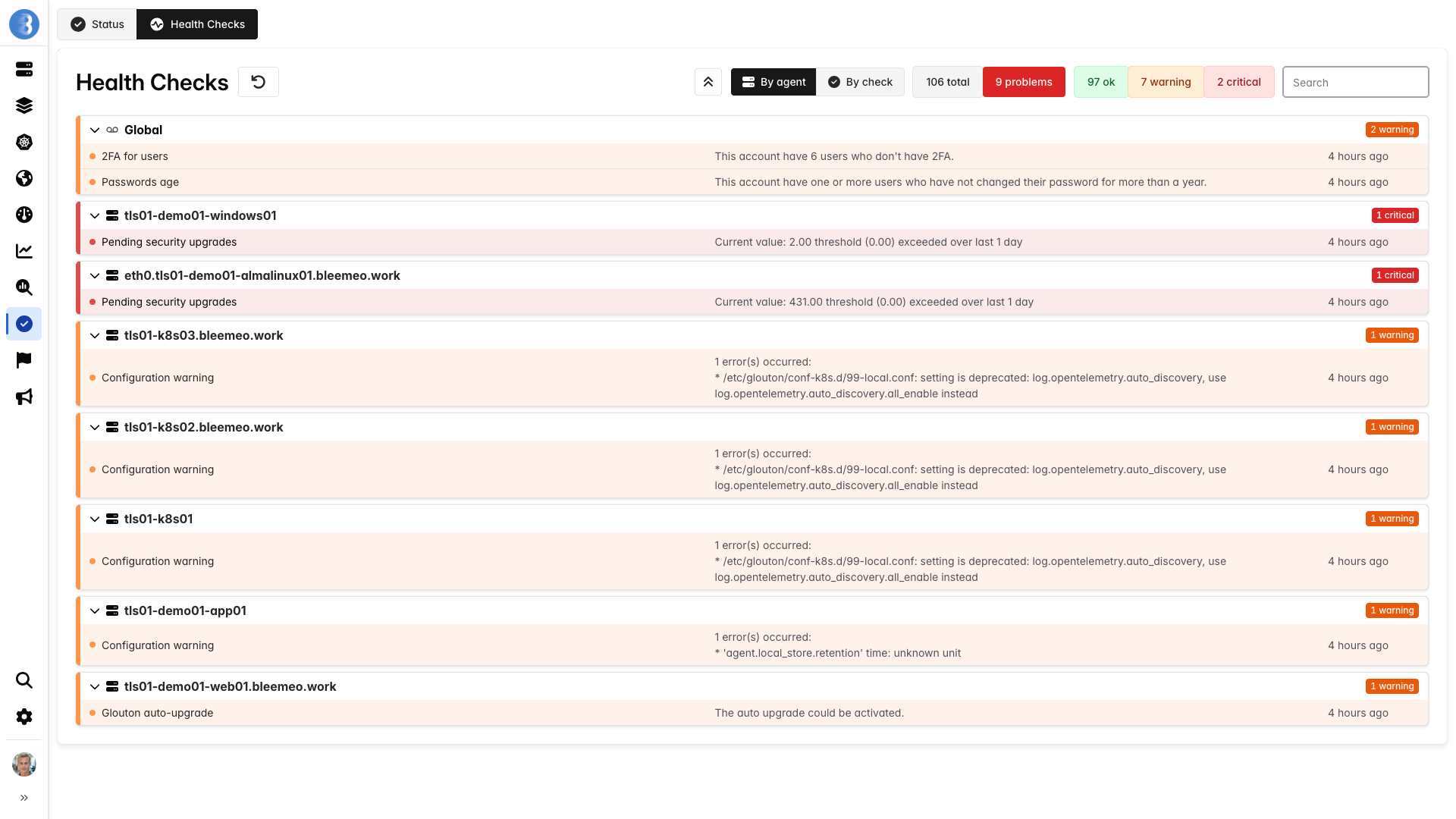
You can filter them by agent’s hostname or name, or display only those with a specific status. The list is ordered by agent’s hostname and entity name.
The columns are:
- the origin
- the entity name
- a text explaining the problem
- the date of the last change of state for this entity
This page is useful to see at a glance which health checks currently have problems. You can see your healthcheck dashboard.
Health Checks details
Section titled “Health Checks details”There are two types of healthcheck:
- Account’s health checks
- Agent’s health checks
Account’s health checks
Section titled “Account’s health checks”| Name | Description | How to fix |
|---|---|---|
| 2FA for users | This check verifies that all users of the account have set the 2FA | Add 2FA on all account’s users |
| Passwords age | This check warns you if any of the account users have not changed their password for more than a year. | Change your password more frequently |
| Reaching account limits | This check warns you when you are close to your account limits for agents, monitors, or recording rules | Contact our support |
| Report creation | This check informs you that you can create a report on a monitor if you have not already done so | Create monitor report on panel |
| Suggest reservation | This check alerts you if you have a reservation in progress that will be ending soon | Renew your reservation |
| Upgrade plan | This check informs you that you could get more metrics and more information about the containers on your servers with a higher plan | Upgrade your plan |
Agent’s health checks
Section titled “Agent’s health checks”| Name | Description | How to fix |
|---|---|---|
| Agent outdated | This check verifies that the version of Glouton is not older than the recommended version | Upgrade Glouton |
| Configuration warning | This check verifies that you have no problems in the Glouton configuration files. | Check your configuration files |
| Duplicated agent | This check verifies that you do not have several Glouton processes running on the same server | Link to fix |
| Glouton auto-upgrade | This check verifies that the Glouton is auto-upgrading, if this is possible | Use auto-upgrade |
| IPMI install | This check alerts you if you don’t have IPMI installed and it could be useful. | Install IPMI |
| Pending security upgrades | This check verifies that you have no pending security updates on your server. | Update security packages on your server |
| Reaching agent limits | This check warns you if you are approaching the limit for the number of metrics per Glouton | Contact our support |
| Service configuration needed | This check verifies that the services that require configuration are properly configured | A service needs configuration |
| Smartctl install | This check alerts you if you do not have smartctl installed on your server and it could be useful. | Install smartctl |
| Swap needed | This check looks at your memory usage over the last week and suggests you add swap if it makes sense. | Add swap on your server |