

VMware vSphere Monitoring Overview
Prerequisites
Section titled “Prerequisites”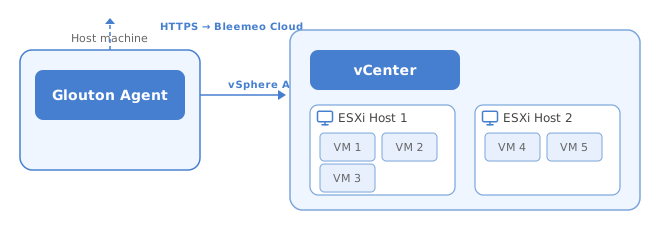
VMware vSphere monitoring requires a Bleemeo Glouton agent installed and connected to your Bleemeo account on a Linux or Windows machine. The agent communicates with the vSphere API to retrieve facts and metrics from clusters, hosts, VMs, and datastores.
Glouton supports both vCenter and standalone ESXi hosts. When connecting to a vCenter, all managed hosts, VMs, clusters, and datastores are automatically discovered.
The vSphere user account needs read-only permissions on the objects you want to monitor (datacenter, cluster, hosts, VMs, datastores).
See the installation guide if you don’t have Glouton installed yet.
Monitored Objects
Section titled “Monitored Objects”Glouton automatically discovers and monitors the following vSphere resource types:
| Object | Description |
|---|---|
| Cluster | Aggregated CPU and memory metrics computed from all hosts in the cluster |
| Host | ESXi host metrics including CPU, memory, swap, disk I/O, network, and VM counts |
| VM | Virtual machine metrics including CPU, memory, swap, disk I/O, network, and filesystem usage |
| Datastore | Storage capacity, usage, and I/O metrics |
Discovery runs automatically — when new hosts, VMs, or datastores are added to your vCenter, Glouton detects them within minutes.
Next Steps
Section titled “Next Steps”- Configuration — set up vCenter or ESXi connection details