

VMware vSphere Monitoring Overview
Prerequisites
Section titled “Prerequisites”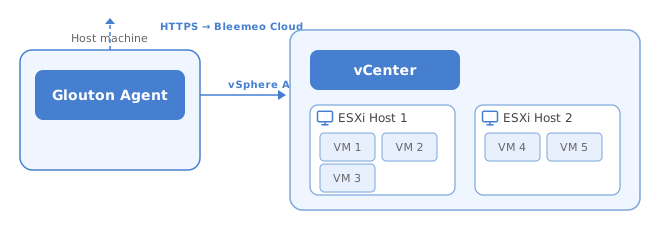
VMware vSphere monitoring requires a Bleemeo Glouton agent installed and connected to your Bleemeo account on a Linux or Windows machine. The agent communicates with the vSphere API to retrieve facts and metrics from clusters, hosts, and VMs.
Glouton supports both vCenter and standalone ESXi hosts. When connecting to a vCenter, all managed hosts, VMs, and datastores are automatically discovered.
The vSphere user account needs read-only permissions on the objects you want to monitor (datacenter, cluster, hosts, VMs).
See the installation guide if you don’t have Glouton installed yet.
Configuration
Section titled “Configuration”To enable VMware vSphere monitoring, add the vCenter or ESXi connection details to your Glouton configuration. You can monitor multiple vCenter appliances or standalone ESXi hosts.
sudo tee /etc/glouton/conf.d/99-vsphere.conf > /dev/null << 'EOF'vsphere:  - url: "https://<vcenter-url>/sdk"    username: "<username>"    password: "<password>"    insecure_skip_verify: false    skip_monitor_vms: falseEOF
sudo systemctl restart glouton
Create or edit the file C:\ProgramData\glouton\conf.d\99-vsphere.conf:
vsphere: - url: "https://<vcenter-url>/sdk" username: "<username>" password: "<password>" insecure_skip_verify: false skip_monitor_vms: falseThen restart the Glouton service:
Restart-Service gloutonConfiguration Options
Section titled “Configuration Options”| Option | Description |
|---|---|
url | URL of the vCenter or ESXi SDK endpoint (e.g., https://vcenter.example.com/sdk) |
username | Username for vCenter authentication |
password | Password for vCenter authentication |
insecure_skip_verify | Set to true to skip SSL certificate verification (use only for self-signed certificates) |
skip_monitor_vms | Set to true to only monitor hosts and skip VM metrics |
Metrics
Section titled “Metrics”| Metric | Description |
|---|---|
cpu_used | Percentage of CPU capacity being used by the host |
mem_total | Total reservation, available and consumed, for powered-on VMs on the host |
mem_used_perc | Percentage of memory being used by the host |
swap_in | Amount of memory swapped in by the host |
swap_out | Amount of memory swapped out by the host |
io_read_bytes | Amount of data read from the disk by the host |
io_write_bytes | Amount of data written to the disk by the host |
net_bits_sent | Average rate at which data was transmitted by the host |
net_bits_recv | Average rate at which data was received by the host |
vms_running_count | Count of VM(s) currently running on the host |
vms_stopped_count | Count of VM(s) currently stopped on the host |
| Metric | Description |
|---|---|
cpu_used | CPU utilization by the VM |
vsphere_vm_cpu_latency_perc | Percent of the time the VM is waiting for CPU to be available |
mem_used_perc | Percent of the memory used by the VM |
swap_used | Amount of swapped memory of the VM |
io_read_bytes | Amount read from the disk by the VM |
io_write_bytes | Amount written to the disk by the VM |
net_bits_sent | Data transmission rate of the VM |
net_bits_recv | Data reception rate of the VM |
disk_used_perc | Filesystem space used in percent |
Labels
Section titled “Labels”vSphere metrics have the following labels:
dcnameclustername(not for standalone ESXis)esxhostname(only for hosts and VMs)vmname(only for VMs)
Additionally, metrics related to datastore, network or disk have an item label, which represents:
- a specific datastore
- a network interface
- a disk
- a partition
See Also
Section titled “See Also”- Agent Installation — install Glouton on Linux or Windows
- Agent Configuration — full configuration reference
- Alerting — set up alerts on vSphere metrics