

Amazon Web Services Monitoring Overview
Bleemeo can also fetch metrics from CloudWatch and let you build dashboards with CloudWatch metrics and other Bleemeo metrics.
Configuration
Section titled “Configuration”To configure AWS integration, you have in settings to go on the “AWS” tab and enter your AWS Access Key ID and AWS Secret Access Key. You can refer to AWS IAM documentation to create those API keys and configure the appropriate permissions to those keys. Permission needed are detailed below and depends on which metrics are activated.
Those API keys will allow Bleemeo to query your AWS infrastructure.
You can use toggle to choose with CloudWatch metrics you want to activate.
AWS CloudWatch have a free tier equivalent to $10 per month.
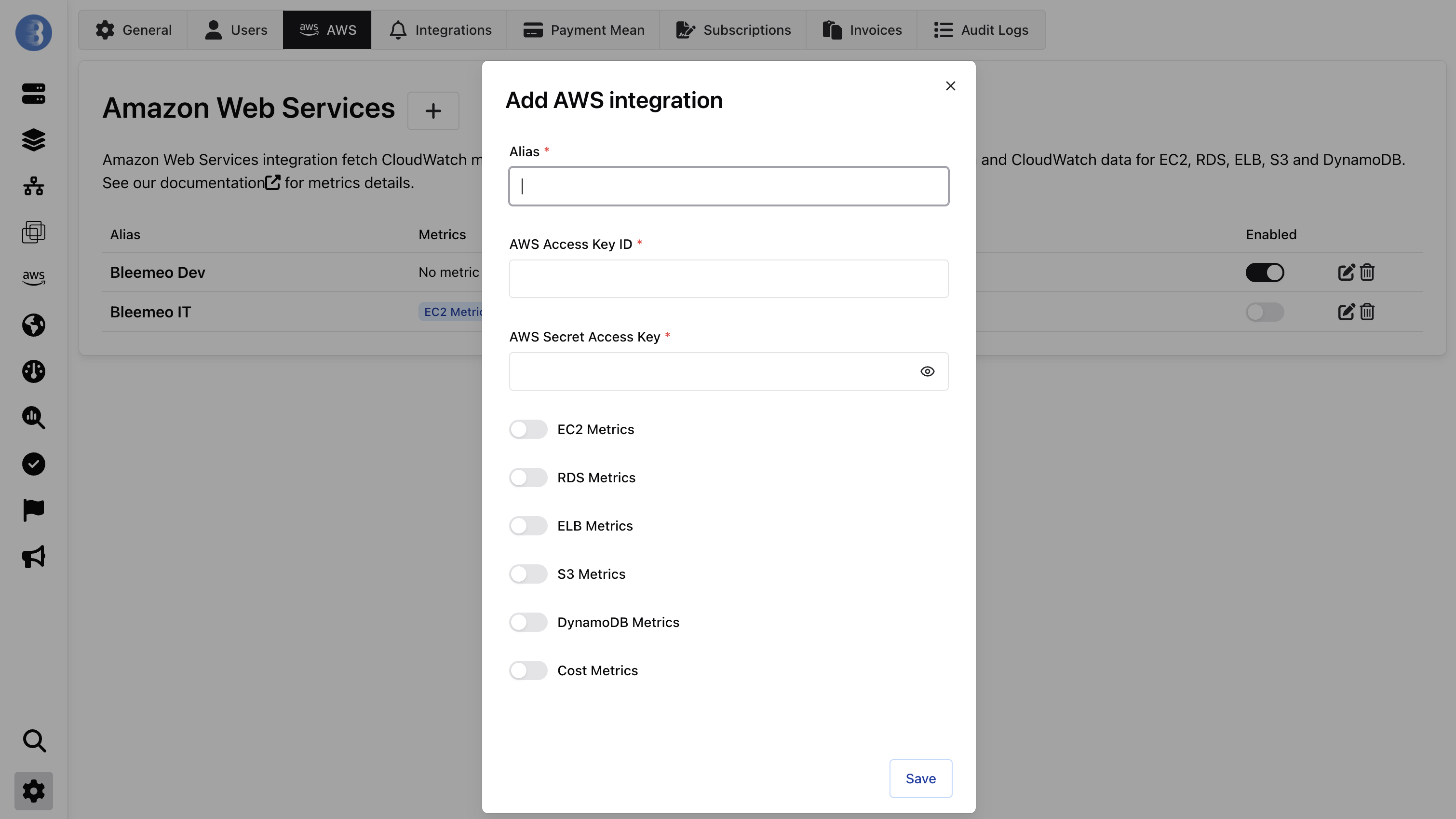
A new AWS section will be added, aws resources will be automatically added in this section, dashboards will be created automatically and you will get additional metrics on your account that you can graph on Custom Dashboard.
Dashboard Template
Section titled “Dashboard Template”We create automatically one dashboard for each AWS type:

Metrics
Section titled “Metrics”We will detail here the needed permissions and all metrics that are fetched from AWS CloudWatch and that you can use in your dashboard.
DynamoDB
Section titled “DynamoDB”Amazon description of the service is available at: https://aws.amazon.com/dynamodb/
Metrics available:
| Metric | Description |
|---|---|
dynamodb_consumed_read_capacity | Number of read unit consumed per second |
dynamodb_consumed_write_capacity | Number write unit consumed per second |
dynamodb_read_capacity_perc | Read capacity used in percent |
dynamodb_write_capacity_perc | Write capacity used in percent |
dynamodb_read_requests | Number read requests per second |
dynamodb_write_requests | Number write requests per second |
dynamodb_read_throttled_requests | Number read request throttled per second |
dynamodb_write_throttled_requests | Number write request throttled per second |
IAM Permissions needed:
{ "Version": "2012-10-17", "Statement": [ { "Action": "cloudwatch:GetMetricStatistics", "Effect": "Allow", "Resource": "*" }, { "Action": "ec2:DescribeRegions", "Effect": "Allow", "Resource": "*" }, { "Action": "dynamodb:ListTables", "Effect": "Allow", "Resource": "*" }, { "Action": "dynamodb:DescribeTable", "Effect": "Allow", "Resource": "*" } ]}Estimated AWS cost:
- For each DynamoDB tables, every minute Bleemeo will do 4 cloudwatch API call: $1.76 / month / table
Amazon description of the service is available at: https://aws.amazon.com/ec2/
Metrics available:
| Metric | Description |
|---|---|
ec2_cpu_credit_balance | Burstable time in percents |
ec2_cpu_credit_usage | CPU burst time in seconds |
ec2_cpu_surplus_credit_balance | Surplus of consumed CPU credits |
ec2_cpu_surplus_credits_charged | Charged surplus of consumed CPU credits |
ec2_cpu_used | CPU used in percent |
ec2_io_burst_balance | Available disk burst credits in percentage |
ec2_io_read_bytes | Disk read throughput in bytes per second |
ec2_io_reads | Number of reads completed per second |
ec2_io_utilization | Disk IO utilization in percent |
ec2_io_write_bytes | Disk write throughput in bytes per second |
ec2_io_writes | Number of writes completed per second |
ec2_net_bits_recv | Network traffic received in bits per second |
ec2_net_bits_sent | Network traffic sent in bits per second |
IAM Permissions needed:
{ "Version": "2012-10-17", "Statement": [ { "Action": "cloudwatch:GetMetricStatistics", "Effect": "Allow", "Resource": "*" }, { "Action": "ec2:DescribeRegions", "Effect": "Allow", "Resource": "*" }, { "Action": "ec2:DescribeInstances", "Effect": "Allow", "Resource": "*" }, { "Action": "ec2:DescribeVolumes", "Effect": "Allow", "Resource": "*" } ]}Estimated AWS cost:
- For each EC2 with one EBS attached, every 5 minutes Bleemeo will do 8 CloudWatch API call: $0.7 / month / ec2
- For each additional EBS attached, every 5 minutes Bleemeo will do 5 additional CloudWatch API call: $0.44 / month / additional attached EBS
- For example, each EC2 with 2 EBS attached, every 5 minutes Bleemeo will do 13 CloudWatch API call: $1.14 / month / ec2
Amazon description of the service is available at: https://aws.amazon.com/elasticloadbalancing/
Application Load Balancer (ALB), Network Load Balancer (NLB) and Classic Load Balance (ELBv1) are supported.
Metrics available:
| Metric | Description |
|---|---|
elb_request | Number of requests per second |
elb_unhealthy_host | Number of backend unhealthy |
elb_healthy_host | Number of backend healthy |
elb_backend_errors | Number of backend connection errors per second |
IAM Permissions needed:
{ "Version": "2012-10-17", "Statement": [ { "Action": "cloudwatch:GetMetricStatistics", "Effect": "Allow", "Resource": "*" }, { "Action": "ec2:DescribeRegions", "Effect": "Allow", "Resource": "*" }, { "Action": "elasticloadbalancing:DescribeLoadBalancers", "Effect": "Allow", "Resource": "*" }, { "Action": "elasticloadbalancing:DescribeTargetGroups", "Effect": "Allow", "Resource": "*" } ]}Estimated AWS cost:
- For each ELB, every minute Bleemeo will do 4 cloudwatch API call: $1.76 / month / elb
Amazon description of the service is available at: https://aws.amazon.com/rds/
Metrics available:
| Metric | Description |
|---|---|
rds_cpu_used | CPU used in percent |
rds_mem_used | Memory used in bytes |
rds_mem_used_perc | Memory used in percent |
rds_mem_free | Memory available in bytes |
rds_disk_used | Filesystem space used in bytes |
rds_disk_used_perc | Filesystem space used in percent |
rds_disk_free | Filesystem space available in bytes |
rds_io_reads | Number of reads completed per second |
rds_io_writes | Number of writes completed per second |
rds_connection | Number of DB connections |
IAM Permissions needed:
{ "Version": "2012-10-17", "Statement": [ { "Action": "cloudwatch:GetMetricStatistics", "Effect": "Allow", "Resource": "*" }, { "Action": "ec2:DescribeRegions", "Effect": "Allow", "Resource": "*" }, { "Action": "rds:DescribeDBInstances", "Effect": "Allow", "Resource": "*" }, { "Action": "rds:DescribeDBClusters", "Effect": "Allow", "Resource": "*" } ]}Estimated AWS cost:
- For each RDS instance, every minute Bleemeo will do 6 cloudwatch API call: $2.64 / month / db instance
Amazon description of the service is available at: https://aws.amazon.com/s3/
Metrics available:
| Metric | Description |
|---|---|
s3_objects_count | Number of objects in the bucket |
s3_bucket_size | Bucket size in bytes |
IAM Permissions needed:
{ "Version": "2012-10-17", "Statement": [ { "Action": "cloudwatch:GetMetricStatistics", "Effect": "Allow", "Resource": "*" }, { "Action": "ec2:DescribeRegions", "Effect": "Allow", "Resource": "*" }, { "Action": "s3:ListAllMyBuckets", "Effect": "Allow", "Resource": "*" }, { "Action": "s3:GetBucketLocation", "Effect": "Allow", "Resource": "*" } ]}Estimated AWS cost:
- For each S3 buckets, few times a day (up to 3) Bleemeo will do 4 cloudwatch API call: less than $0.01 / month / buckets
Account
Section titled “Account”In account aws integration, we have global metrics of account:
Metrics available:
| Metric | Description |
|---|---|
account_cost_usd | Daily cost in USD |
account_cost_current_usd | Current monthly cost in USD |
account_cost_forecast_usd | Cost forecast at the end of the month in USD |
account_saving_plan_coverage | Saving plan coverage in percent |
account_saving_plan_utilization | Saving plan utilization in percent |
IAM Permissions needed:
{ "Version": "2012-10-17", "Statement": [ { "Effect": "Allow", "Action": [ "ce:GetCostAndUsage", "ce:GetSavingsPlansUtilization", "ce:GetSavingsPlansCoverage", "ce:GetCostForecast" ], "Resource": "*" } ]}Estimated AWS cost:
- For each AWS Account, Bleemeo will do one cost explorer API call for each 4 metrics: $1.24 / month / account