

SquirrelDB High Availability
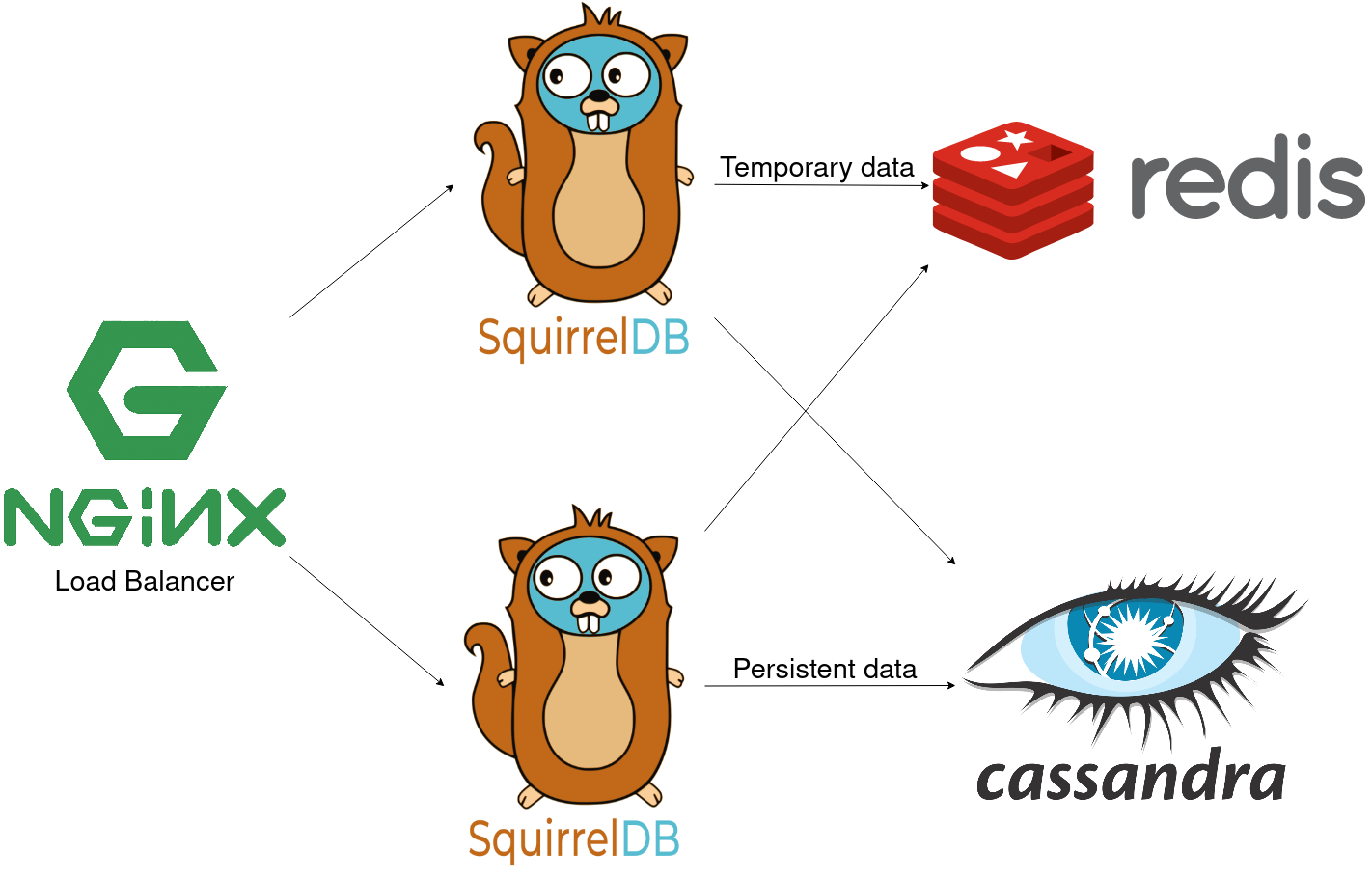
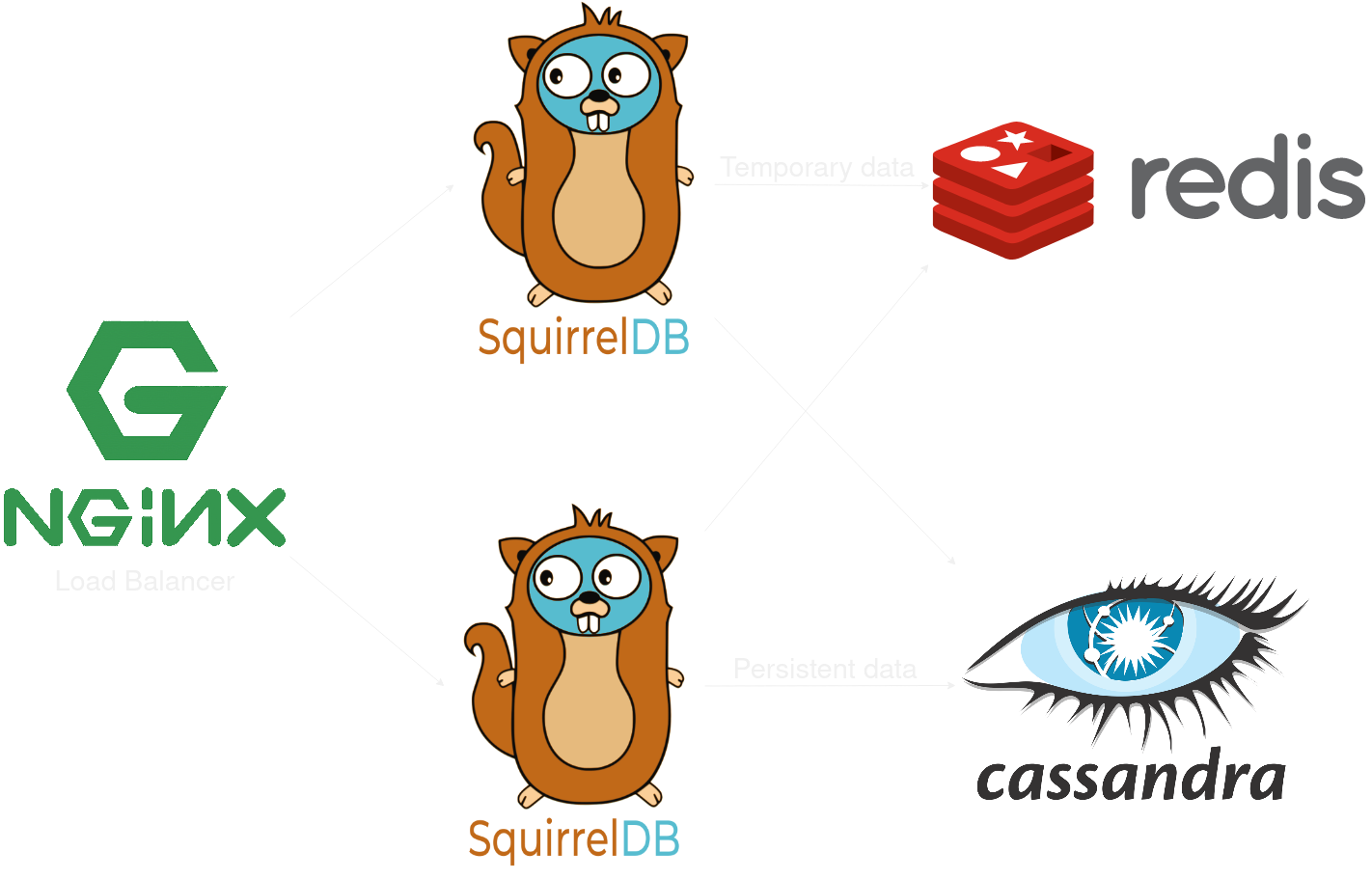
SquirrelDB can provide both a scalable and highly available Prometheus remote store, on top of either storage backend.
In both cases, you will need:
- A Redis cluster (start at 6 nodes)
- A load-balancer in front of SquirrelDB (e.g. nginx)
- Two or more SquirrelDB instances
- A cluster of the database backend, detailed below
For further details on how to configure a Cassandra cluster, a ClickHouse cluster or a Redis cluster, look at their respective documentation.
The long term storage needs 3 or more Cassandra nodes, with a replication factor greater than 1 (3 is recommended).
Each SquirrelDB will need to be configured to find the Cassandra and Redis clusters. For example, the configuration may look like this:
cassandra:  # You should have enough addresses here to have at least one that responds.  # Once connected, SquirrelDB will get all other Cassandra nodes from the one it connected to.  # So either have a majority of node addresses or a virtual address always reachable (load-balancer, Kubernetes service, ...).  addresses:    - "cassandra1:9042"    - "cassandra2:9042"  # Replication factor should be odd, since SquirrelDB relies on quorum for its consistency.  replication_factor: 3
redis:  # Like for Cassandra addresses, you just need to have enough addresses to connect to one  # working Redis node, from here the client will discover all nodes in the cluster.  addresses:    - "redis1:6379"    - "redis2:6379"
A Docker compose is available to test this setup on the SquirrelDB repository.
The long term storage needs a ClickHouse cluster, which means:
- 3 ClickHouse Keeper nodes
- 2 or more ClickHouse server nodes
Each SquirrelDB will need to be configured to find the ClickHouse and Redis clusters. For example, the configuration may look like this:
backend: clickhouse
clickhouse:  # List every ClickHouse server node here: there is no node discovery.  # SquirrelDB opens one connection per address, health-checks each of them  # (reachable, holds the tables, replication not lagging) and routes queries only  # to the healthy ones. A node that is down, rebuilt empty or still resyncing is  # excluded automatically, so no external load balancer is needed for ClickHouse.  addresses:    - "clickhouse1:9000"    - "clickhouse2:9000"  # Tables are created with the SQL option "ON CLUSTER <name>", using  # ReplicatedMergeTree engines. This is the cluster name declared in the  # <remote_servers> section of your ClickHouse server configuration.  cluster_name: main_cluster  database: squirreldb  username: squirreldb  password: mypassword
redis: # Like for ClickHouse addresses, you just need to have enough addresses to connect to one # working Redis node, from here the client will discover all nodes in the cluster. addresses: - "redis1:6379" - "redis2:6379"With ClickHouse, Redis holds the write-ahead log and the lease of the instance that drains it, which is what makes the SquirrelDB instances stateless and the buffered points durable.
The storage backends page also documents how to bring back a ClickHouse node that lost its data.
A Docker compose is available to test this setup on the SquirrelDB repository.